Using Data to Fix Game Engagement
Published on | Analytics & Tracking • UX Optimization • Web Development
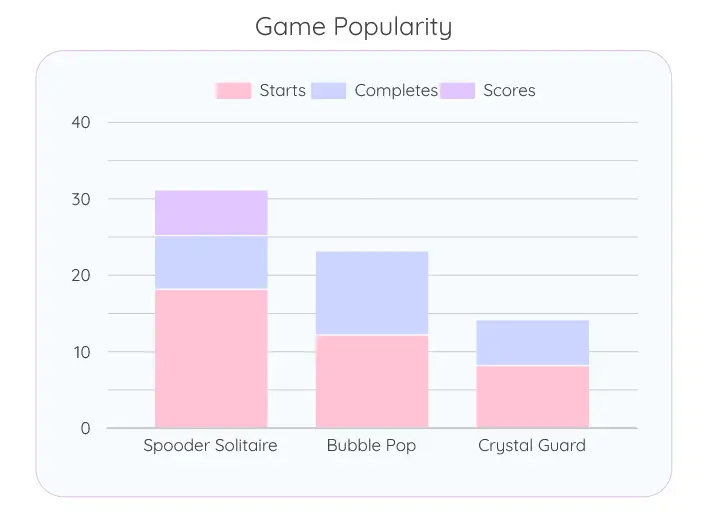
One of the best parts about having custom GA4 tracking on your own portfolio is getting to see exactly how users interact with your work. Recently, I was analyzing my Live Games Dashboard and noticed an interesting behavioral trend.
Players were successfully completing rounds of Bubble Pop and Crystal Guard, but they weren't submitting their scores to the database. In fact, looking at the data, the vast majority of my score submissions were coming almost exclusively from Spooder Solitaire.
The Hypothesis & The Fix
I did some thinking (wow, rare moment! :P) and realized the issue: in Bubble Pop and Crystal Guard, the leaderboard was automatically displayed on the "Game Over" screen before the player had to decide whether or not to submit their own score.
Because they could already see what the top scores were, there was no mystery or incentive to submit their own name if they didn't beat the top players.
The solution was simple: I dove into the JavaScript for both games and delayed the leaderboard fetch. Now, the leaderboard acts as a "reward" that is only revealed after a player submits their score. It's a small, data-driven tweak, but I'm excited to watch the dashboard this week to see if score submission rates improve!
PS: I also fixed a bug that caused the "next bubble" screen in Bubble Pop to display the incorrect bubble. It now really displays the next bubble! 🫧